Profit and Loss Statement Template
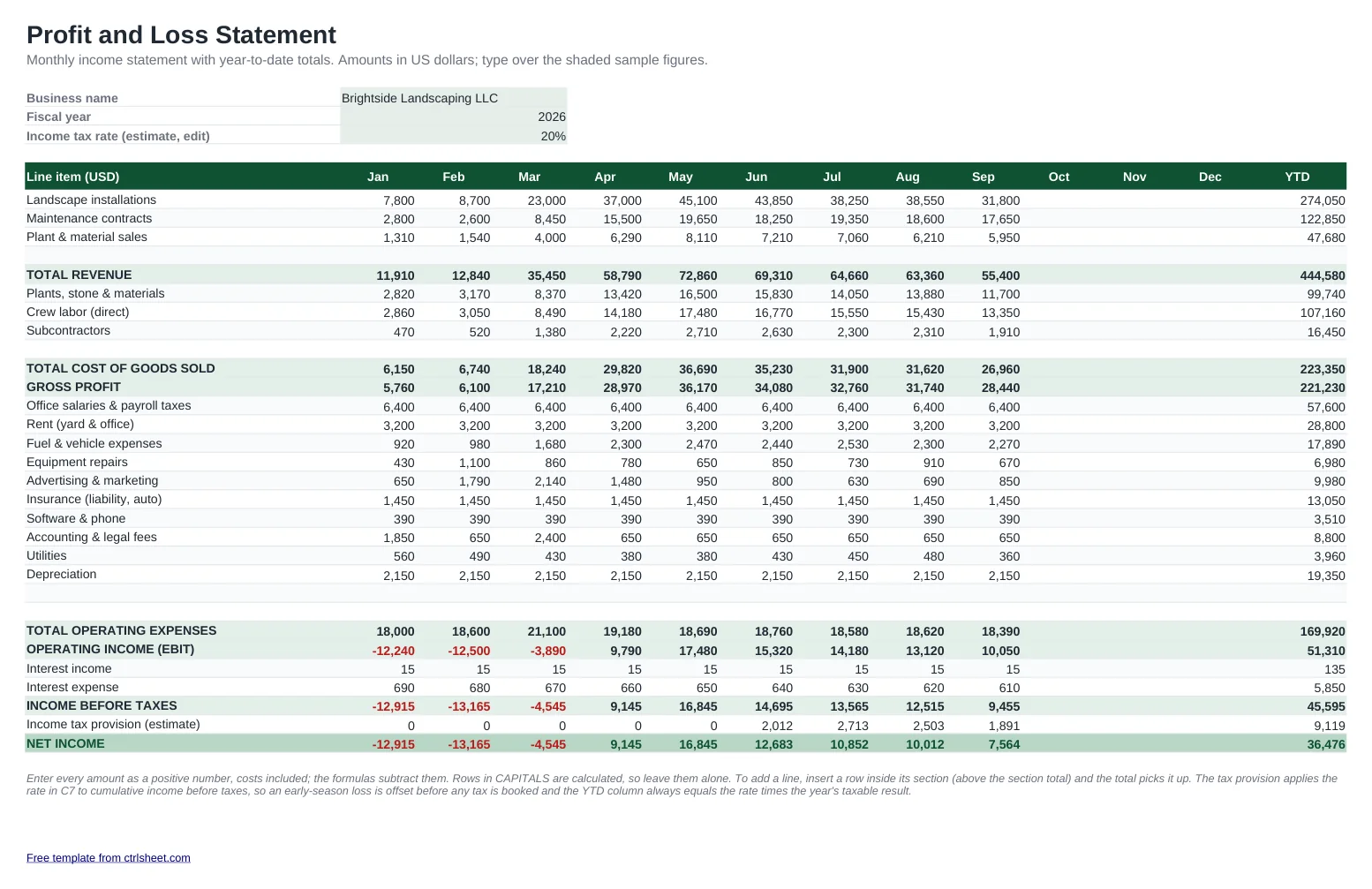
Know whether the business actually made money last month, not just whether there is cash in the bank. This P&L template lays out a classic small-business income statement: revenue lines, cost of goods sold, gross profit, operating expenses by category, operating income (EBIT), interest, income before taxes, an estimated tax provision and net income. Each month gets its own column and the YTD column adds them up as the year goes on.
The sample is a landscaping company in Ohio with a slow winter and a busy spring, so you can see how a losing month shows up in red and how the tax estimate only kicks in once the year turns profitable. A second sheet turns the numbers into a monthly summary with gross margin, net margin and a revenue vs. net income chart.

What's included
- Monthly columns from January to December plus a running year-to-date total
- Standard income statement order: revenue, COGS, gross profit, operating expenses, EBIT, interest, pretax income, tax and net income
- Editable income tax rate with a cumulative provision, so early losses offset later profit
- Summary sheet with gross margin and net profit margin for every month and the year so far
- Column chart of revenue vs. net income; losing months highlighted in red
- Plain formulas that work in Excel, Google Sheets and LibreOffice, no macros
How to use it
- Type your business name, the fiscal year and an estimated income tax rate at the top.
- Rename the revenue, cost and expense lines to match your chart of accounts or your Schedule C categories.
- Replace the sample figures with each month's totals from your bookkeeping, entering costs as positive numbers.
- Insert a row inside a section if you need more lines; the section total includes it automatically.
- Open the Summary sheet to review margins and the monthly chart before you talk to your accountant or lender.
Reading your P&L like a lender would
Watch gross margin first. If it slides while revenue grows, your pricing or your direct costs need attention, and no amount of cutting overhead will fix that.
Keep the same basis all year. If your books are on a cash basis, record income when it is received; on an accrual basis, when it is earned. Mixing the two makes month-to-month comparisons meaningless.
Sole proprietors file business results on Schedule C, so naming your expense lines after its categories makes tax season faster. The tax row here is only a planning estimate: use it to size your quarterly estimated payments, then confirm the actual figure with your tax preparer.
Banks and SBA lenders usually ask for a year-to-date P&L alongside the last full year. Save a copy of this file at each year end so you always have both.
Frequently asked questions
What is the difference between a profit and loss statement and an income statement?
None in practice. Profit and loss statement, P&L and income statement are three names for the same report: revenue minus costs and expenses over a period, ending with net income.
Should I enter expenses as negative numbers?
No. Type every amount as a positive number. The formulas subtract cost of goods sold, operating expenses, interest expense and tax for you.
How is the income tax provision calculated?
It applies the rate you enter to cumulative income before taxes, month by month. A loss in January is offset by profit in later months, and the YTD figure equals your rate times the year's pretax income. It is an estimate for planning, not a tax return.
Can I use it for a fiscal year that does not start in January?
Yes. Type your own month names in the column headers, for example Jul to Jun. The formulas only depend on the column position, not the month name.
Is the template free?
Yes. Download it for Excel or copy it to Google Sheets, with no sign-up and no watermark.
Question or problem with this template? Contact us