Monthly Budget Template
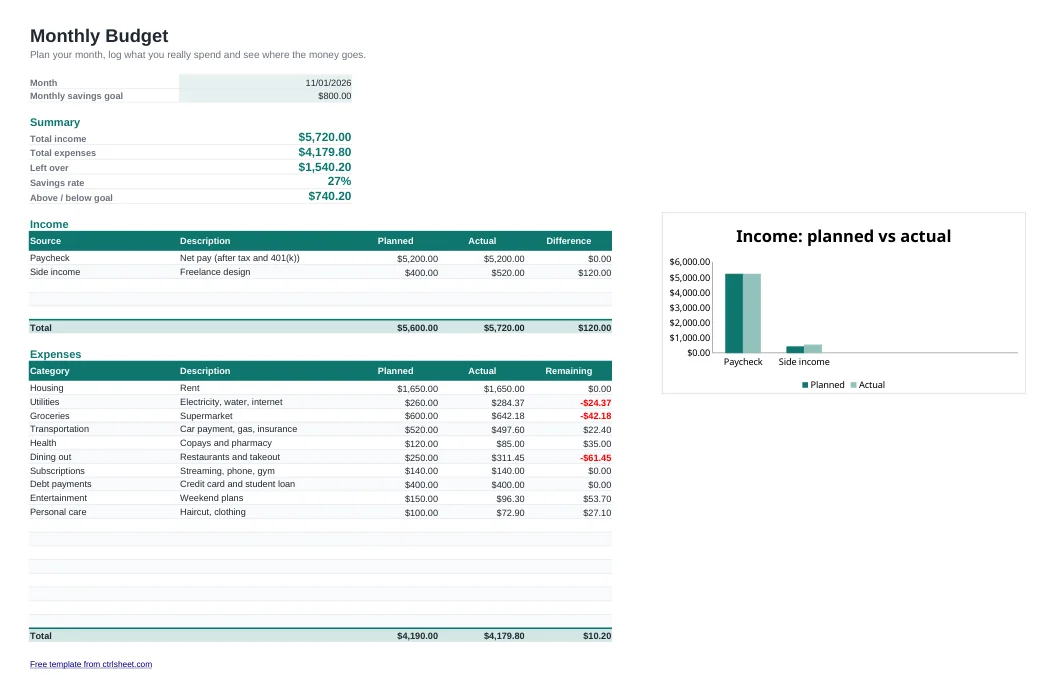
A budget only works if it is quick to update. This monthly budget template keeps everything on one page: what you expect to earn, what you plan to spend, and what actually happened. Totals, the difference against plan and your savings rate calculate themselves, so you can update it in two minutes a week.
It is built for US households, with dollar formatting, a US date format and example categories such as rent, car payment, health copays and student loans. Delete the sample rows and type your own numbers.
What's included
- Planned vs. actual columns for income and expenses, with the difference highlighted in red when you overspend
- Automatic summary: total income, total expenses, money left over and savings rate
- A savings goal that shows how far above or below target you are this month
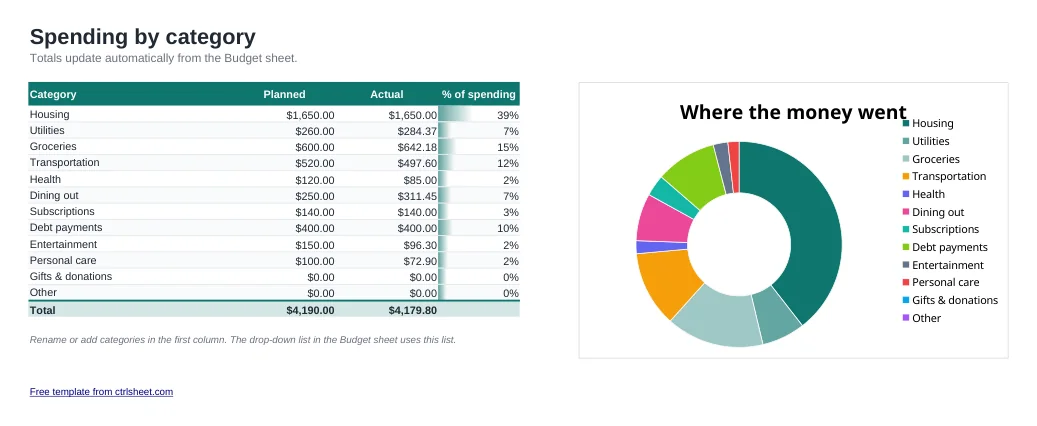
- Category drop-down list and a second sheet that totals spending by category with a chart
- Works in Excel 2010 or later, Excel for Mac, Google Sheets and LibreOffice. No macros
How to use it
- Set the month and your savings goal at the top.
- List your expected take-home pay and any side income under Income.
- Enter each planned expense with a category. Fixed bills first, then groceries, gas and fun money.
- During the month, type what you actually paid in the Actual column.
- Check the Categories sheet at month end to see where you overspent, then copy the sheet for next month.
Budgeting tips that actually stick
Budget your take-home pay, not your salary. Your paycheck is already reduced by federal and state tax, FICA, health premiums and any 401(k) contribution, and that net number is what you can spend.
Treat savings as a bill. Put your savings goal in at the start of the month instead of saving whatever is left. A common starting point is the 50/30/20 split: about half for needs, 30% for wants and 20% for savings and extra debt payments.
Plan for irregular costs such as car registration, insurance premiums and holidays by dividing the yearly amount by 12 and budgeting that every month.
Frequently asked questions
Is this budget template really free?
Yes. You can download it, edit it and use it for personal or business purposes at no cost. No sign-up is required.
Can I use it in Google Sheets?
Yes. Download the file and open it with Google Sheets, or upload it to Google Drive. All formulas, drop-down lists and charts keep working.
How do I start a new month?
Right-click the Budget tab, choose Move or Copy, tick Create a copy, then clear the Actual column. Keeping one tab per month gives you a full year of history in a single file.
Can I add more expense rows?
Yes. Insert new rows inside the Expenses table, above the Total row, and the totals and category summary will include them automatically.