Profit and Loss Account Template
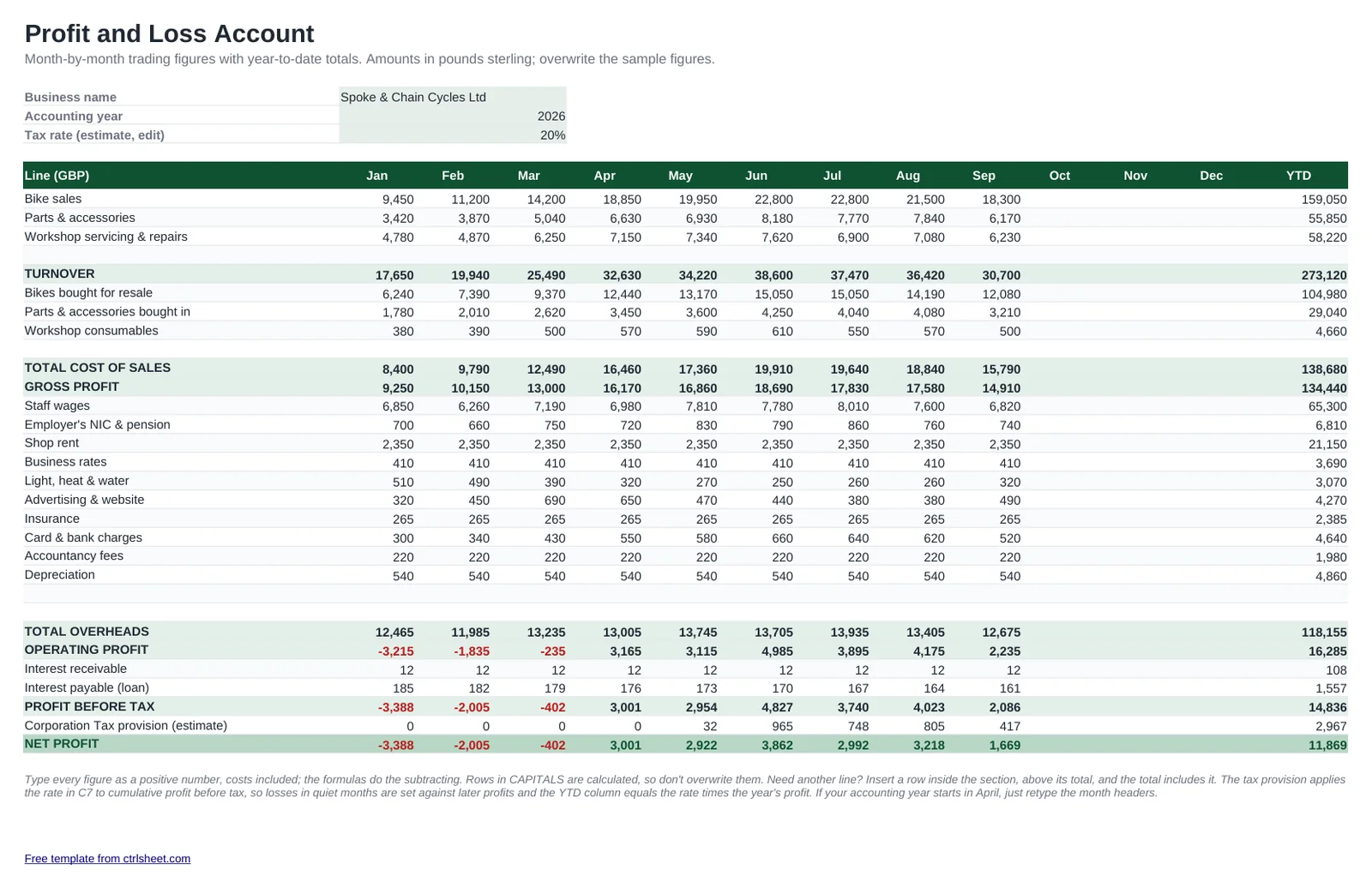
A profit and loss account shows whether trading made a profit over the period, which is a different question from how much is in the bank. This spreadsheet follows the familiar UK layout: turnover, cost of sales, gross profit, overheads, operating profit, interest receivable and payable, profit before tax, a Corporation Tax estimate and net profit, with a column for every month and a year-to-date total.
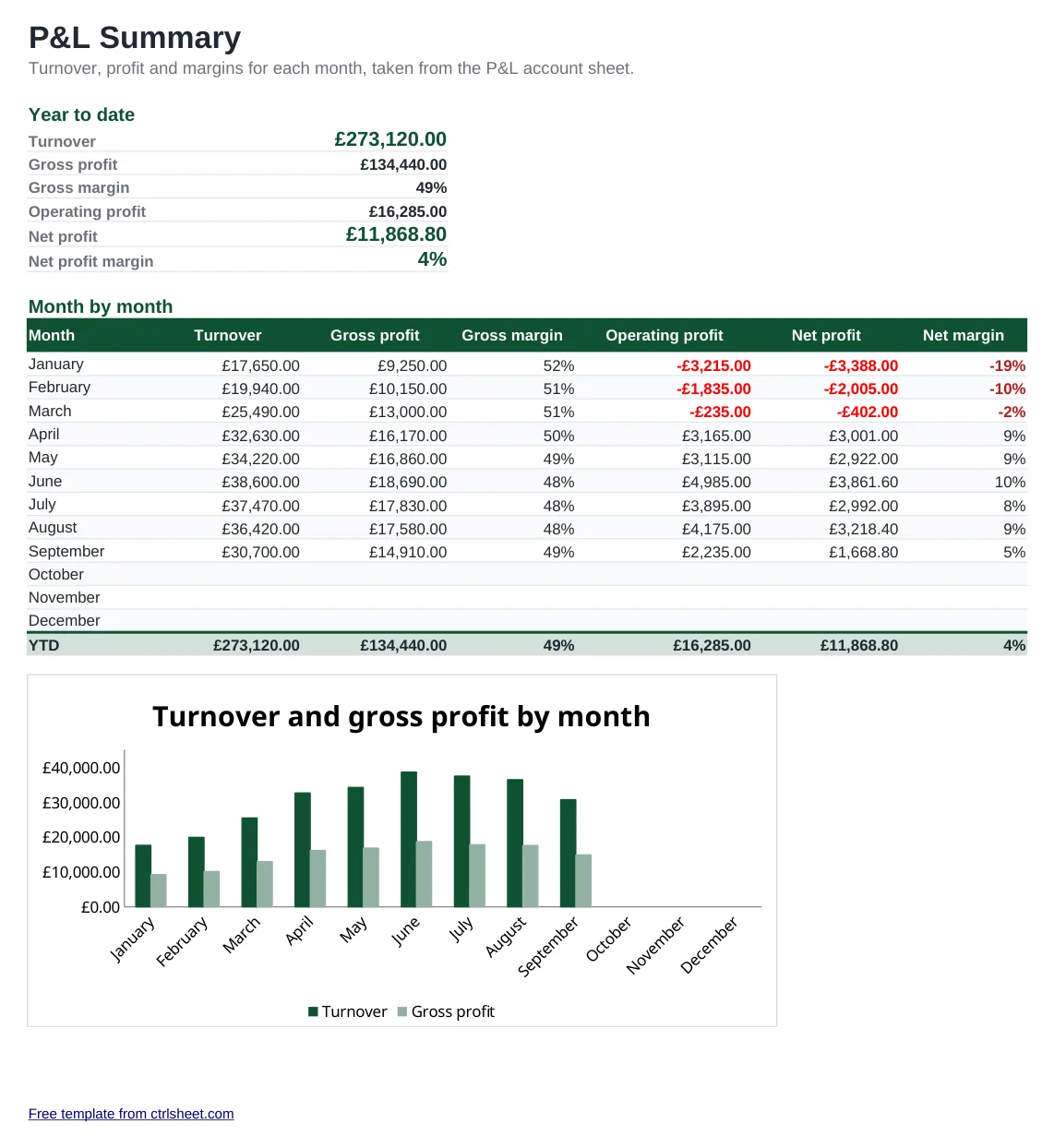
The example is an independent bike shop in Bristol: busy from spring to late summer, quieter in winter, with workshop income that evens things out. Swap in your own figures from Xero, QuickBooks, FreeAgent or your cash book, and the Summary sheet shows turnover, gross margin and net margin month by month with a chart.
What's included
- Twelve monthly columns and a year-to-date total for every line
- UK wording throughout: turnover, cost of sales, overheads, interest payable, profit before tax
- Editable tax rate with a cumulative provision, so quiet-month losses are set against later profits
- Summary sheet with gross margin and net profit margin by month
- Chart of turnover against net profit, with loss-making months shown in red
- Works in Excel, Google Sheets and LibreOffice with ordinary formulas, no macros
How to use it
- Enter your business name, the accounting year and an estimated tax rate.
- Rename the turnover, cost of sales and overhead lines so they match your bookkeeping categories.
- Overwrite the sample figures with each month's totals, typing costs as positive numbers.
- Insert a row within a section when you need an extra line, and its total updates on its own.
- Check the Summary sheet each month and share it with your accountant or bank manager.
Getting more out of your P&L
Line up the months with your accounting period. A limited company's year often isn't January to December; just retype the column headers to match your year end.
Sole traders report self-employment income on Self Assessment, which runs to the 5 April tax year. If your accounts use a different year end, keep a copy of the template for each period so the figures are easy to apportion.
The tax row is a planning figure only. Corporation Tax has a small profits rate and marginal relief that depend on your profits and associated companies, so look up the current rates on GOV.UK or ask your accountant, then put your expected rate in the input cell.
Compare gross margin month to month rather than turnover alone. In a retail or trade business, a falling margin is usually the first sign that supplier prices have crept up.
Frequently asked questions
Is a profit and loss account the same as an income statement?
Yes. Profit and loss account is the traditional UK name; income statement and statement of profit or loss are the names used under IFRS. They all show income less costs for a period.
Do I enter costs as minus figures?
No, type them as positive numbers. The formulas take cost of sales, overheads, interest payable and tax away from turnover for you.
Should the figures include VAT?
If you are VAT registered, enter turnover and costs net of VAT, because the VAT you collect belongs to HMRC. If you are not registered, enter the amounts you actually paid and received.
How does the Corporation Tax estimate work?
It multiplies your chosen rate by cumulative profit before tax, so early losses reduce the tax on later profits. The year-to-date figure equals the rate times the year's profit. It is a guide, not a tax computation.
Question or problem with this template? Contact us