Household Budget Spreadsheet
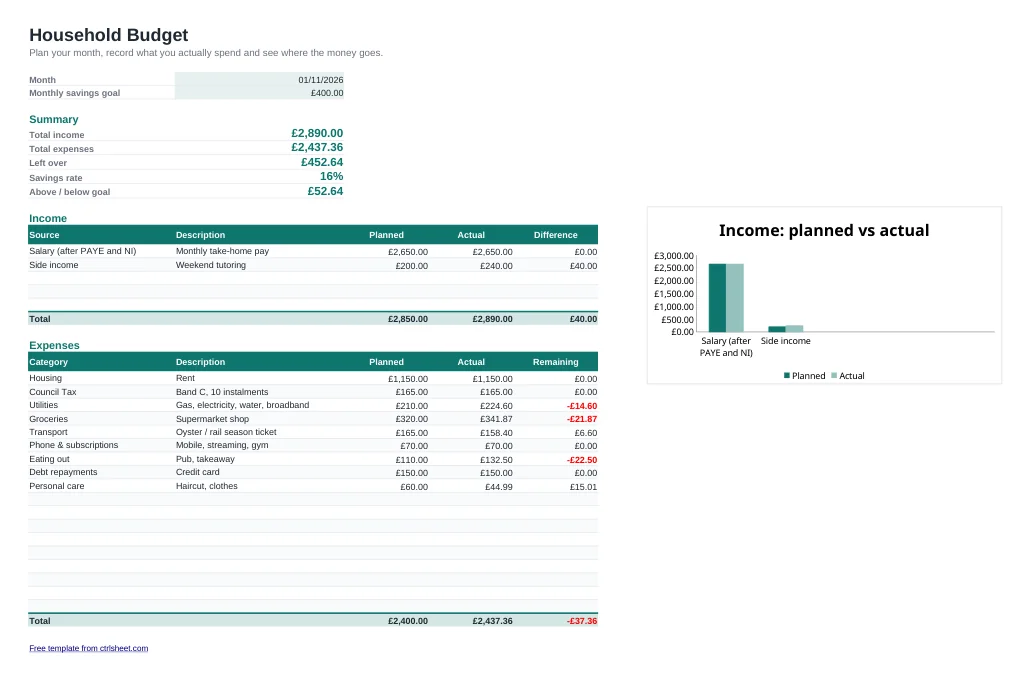
A budget only works if it is quick to keep up to date. This household budget spreadsheet puts everything on one page: what comes in after tax, the bills you expect to pay and what you actually spent. Totals, the difference against plan and your savings rate are worked out for you.
It is set up for UK households, with pounds, UK dates, A4 printing and example lines for rent or mortgage, Council Tax, energy, travel and credit card repayments. Clear the sample rows and add your own figures.
What's included
- Planned and actual columns for income and outgoings, with overspends highlighted in red
- Automatic summary of income, outgoings, money left over and savings rate
- A monthly savings target that shows how far above or below it you are
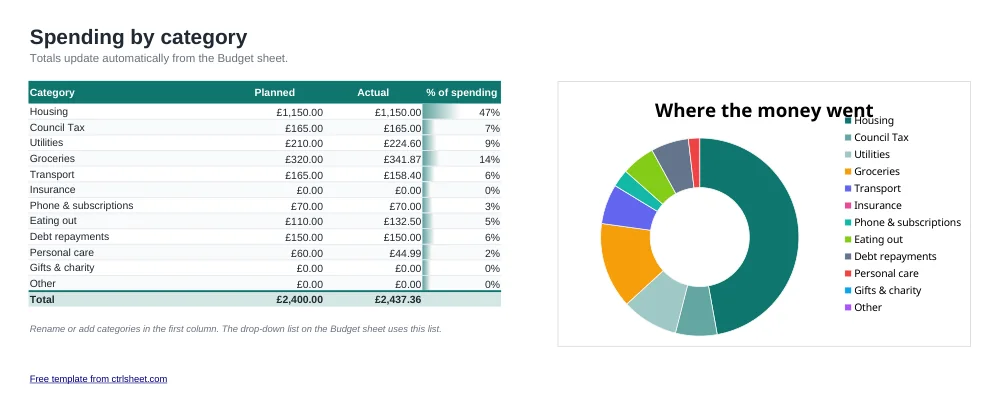
- Category drop-down list and a second sheet that totals spending by category with a chart
- Works in Excel, Excel for Mac, Google Sheets and LibreOffice. No macros
How to use it
- Set the month and your savings target at the top.
- Enter your take-home pay and any other income under Income.
- List your expected outgoings with a category. Start with fixed bills such as rent, Council Tax and energy.
- During the month, type what you actually paid in the Actual column.
- At the end of the month, check the Categories sheet, then copy the Budget tab for next month.
Budgeting tips for UK households
Budget with your take-home pay, the amount left after PAYE income tax, National Insurance, pension auto-enrolment and any student loan repayment. Your payslip shows the exact figure.
Spread annual and seasonal costs across the year. Car insurance, the TV licence, MOT and Christmas are easier to manage if you divide them by 12 and set that amount aside every month. Most councils let you pay Council Tax over 12 months instead of 10.
Pay yourself first. Moving savings into an ISA on payday, rather than saving what is left, is one of the most reliable ways to hit your target. The 50/30/20 split is a good starting point: half for needs, 30% for wants and 20% for savings and extra debt repayments.
Frequently asked questions
Is this budget spreadsheet free?
Yes. You can download, edit and use it at home or at work at no cost, and you don't need to sign up.
Can I use it in Google Sheets?
Yes. Use the Open in Google Sheets button to make your own copy, already set to UK formats, or upload the Excel file to Google Drive.
How do I start a new month?
Right-click the Budget tab, choose Move or Copy, tick Create a copy, then clear the Actual column. One tab per month gives you the whole year in one file.
Can I add more rows?
Yes. Insert rows inside the Expenses table, above the Total row, and the totals and category summary will include them.