Renovation Budget Spreadsheet
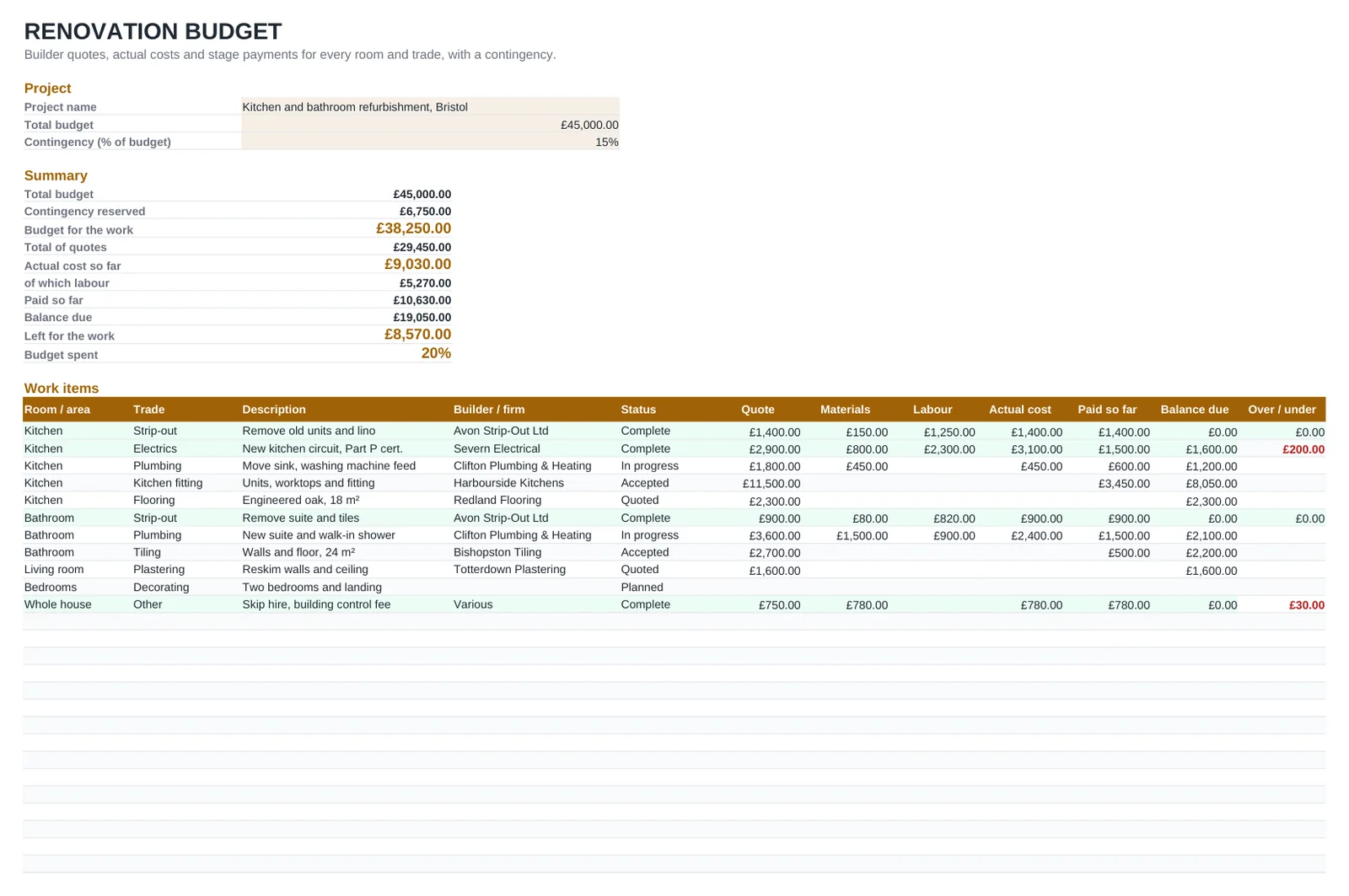
Whether you are refurbishing a Victorian terrace or just redoing the kitchen and bathroom, the money goes out in dozens of small pieces: a deposit to the kitchen company, first fix for the electrician, the skip, the tiler's balance. This spreadsheet keeps them together. Enter your total budget and a contingency, then list each job by room and trade with the builder's quote. As invoices arrive you add materials and labour, and every line shows the actual cost, what you have paid and what is still owed.
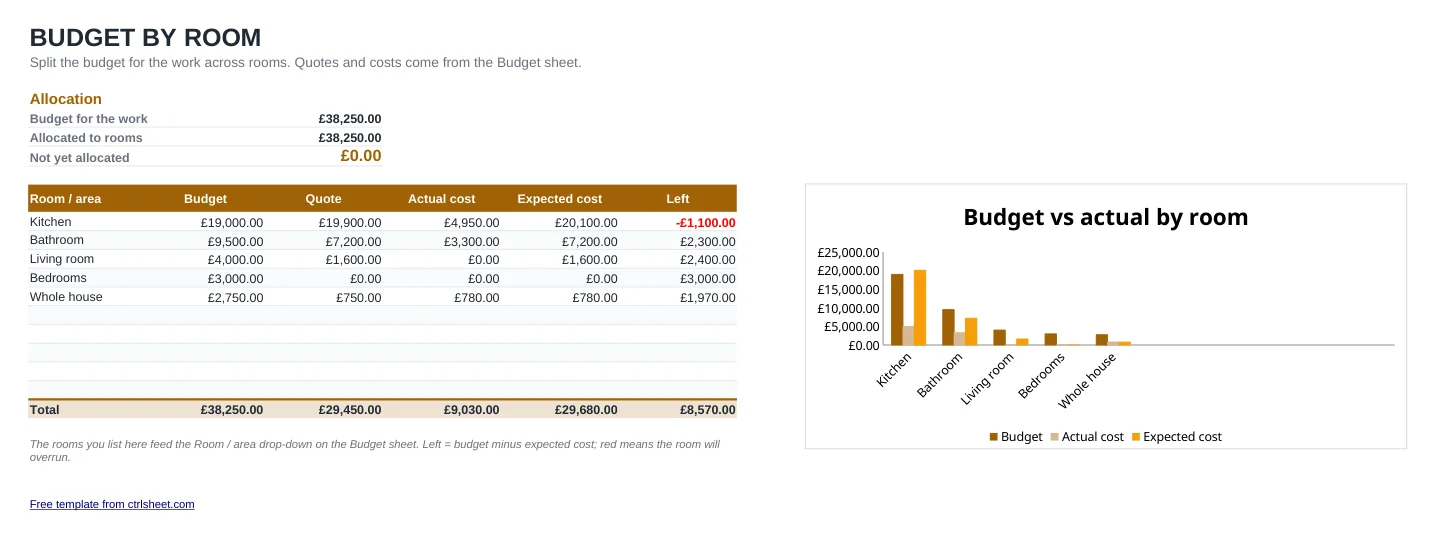
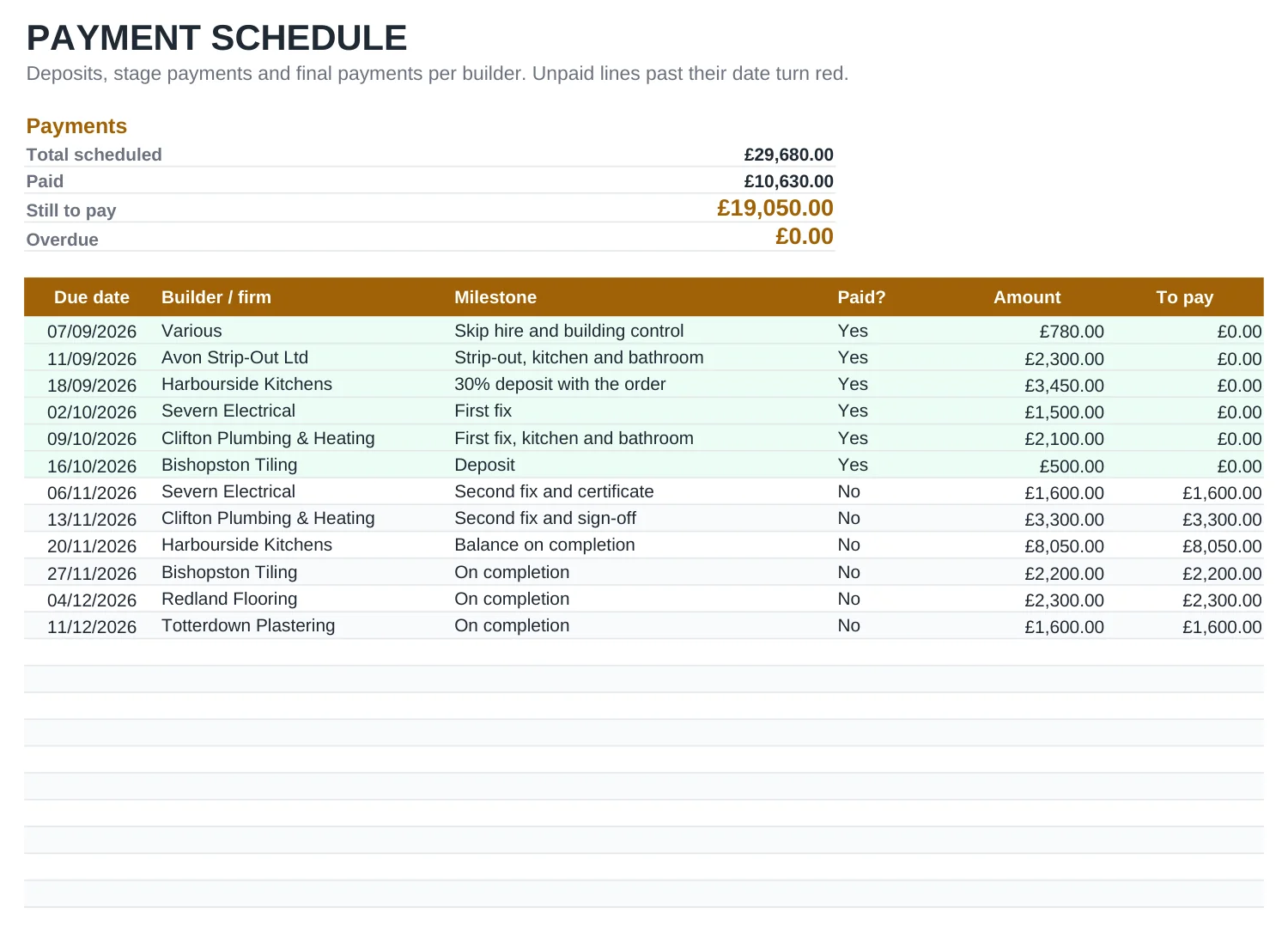
All amounts are entered including VAT, exactly as they appear on quotes and invoices, so the totals match what leaves your bank account. A second sheet splits the budget by room with a chart of budget against actual, and the third is a schedule of deposits and stage payments that highlights anything overdue.
What's included
- Total budget and an editable contingency percentage, with the budget for the work worked out for you
- Jobs by room and trade with quote, materials, labour, actual cost, paid and balance due
- Over / under column showing in red any job running above the builder's quote
- Budget by room sheet with a chart of budget, actual and expected cost
- Stage payment schedule; unpaid payments past their date turn red
- Opens in Excel, Google Sheets and LibreOffice, prints on A4
How to use it
- Delete the sample rows or type over them.
- Enter the project name, total budget and contingency on the Budget sheet.
- List each room with the amount you want to spend on the By room sheet.
- Add every job with its room, trade, builder, quote and status.
- Fill in materials, labour and payments as invoices arrive, and mark a job Complete when it is signed off.
- Plan deposits and stage payments on the Payments sheet and set each to Yes when paid.
Tips for a refurbishment that stays on budget
Ask for a written quote, not an estimate. A quote is a fixed price for the work described; an estimate is a best guess that can move. Make sure it says whether VAT is included, as not every builder is VAT-registered.
Check early whether you need Building Regulations approval. Notifiable electrical work, new bathrooms with drainage changes and structural alterations usually do, and you will want the completion certificate when you sell. If you are working on a shared wall with a neighbour, read up on the Party Wall etc. Act 1996 before work starts.
Agree stage payments linked to finished work rather than a large sum up front, and keep the last payment until snagging is done. Put each stage into the Payments sheet so you can see the cash you need month by month.
A contingency of 10 to 20 % is common advice. In older properties, budget towards the top of that range: lifting floorboards and stripping plaster often reveals more work.
Frequently asked questions
Should I enter prices with or without VAT?
With VAT. Enter every amount as your builder quotes and invoices it, including VAT where it is charged. That way the totals match what you actually pay.
How much contingency should I allow?
Many people allow 10 to 20 % of the total. The figure is an input on the Budget sheet, so you can start at 15 % and adjust it as quotes come in.
What does Balance due show?
What you still expect to pay for each job: the quote, or the actual cost if that is already higher, minus payments made. When you mark a job Complete it switches to the actual cost.
Can I use it for an extension or a loft conversion?
Yes. Use areas such as Extension, Loft or Whole house instead of rooms, and add the trades you need. The totals, chart and payment schedule work the same way.
Question or problem with this template? Contact us